

Bandcamp Music 
Section titled “Bandcamp Music ”Music Assistant has support for Bandcamp. Contributed and maintained by ALERTua
CAUTION
DISCLAIMER Please note that Bandcamp does not offer an official API to retrieve data and streams. This means that everything is built on a best-effort basis.
NOTE
Identity token cookie needed for Bandcamp Account Collection access. Without it, library syncing options won’t work.
Features
Section titled “Features”| Subscription FREE | Yes |
| Self-Hosted Local Media | No |
| Media Types Supported | Artists, Albums, Tracks |
| Recommendations Supported | No |
| Lyrics Supported | Yes |
| Radio Mode | No |
| Maximum Stream Quality | Lossy, MP3 (128kbps) |
| Login Method | Cookie (optional) |
- Searching the Bandcamp catalogue
- The highest available stream from Bandcamp will be selected for playback
Configuration
Section titled “Configuration”- Providing an identity cookie is optional, but allows importing owned albums as library items.
- Tweak Top Tracks Limit to balance search speed and quantity of search results.
NOTE
Cookies may expire after some time. This means that you may have to replace the identity cookie in the provider configuration if library synchronization begins to fail.
Obtaining the Identity Cookie
Section titled “Obtaining the Identity Cookie”-
Open Bandcamp in your browser.
-
Open the cookies storage via View -> Developer -> Developer Tools -> (Application) -> Storage -> Cookies ->
https://bandcamp.com. Note that this might be named differently based on your browser. It should open a window similar to this: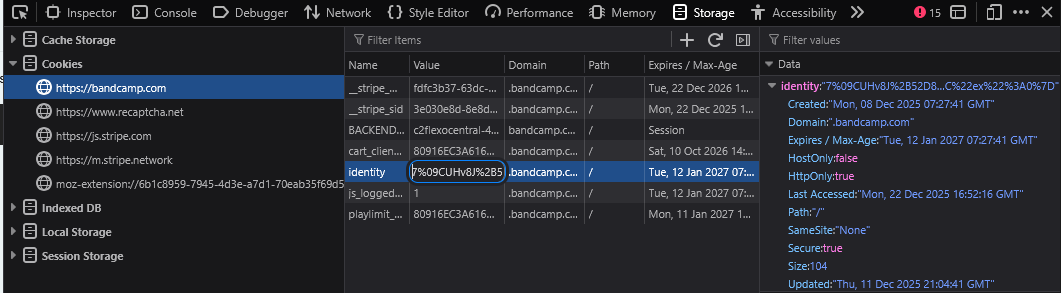
-
Find
identitycookie -
Double-click its value and copy its contents
Configuring the provider
Section titled “Configuring the provider”- Navigate to ‘Settings’
- Under Music Sources, click ‘Add a music source’, select ‘Bandcamp’, and fill in the identity cookie if needed
- Change optional values
- Click ‘Save’
Known Issues / Notes
Section titled “Known Issues / Notes”- This provider mimics Bandcamp. Do not expect to see the same search results as you would when using Bandcamp itself
- Slow Loading for Large Labels: When browsing a music label with a large catalog (dozens to hundreds of albums), indexing may take several minutes. This happens because Bandcamp limits how quickly data can be retrieved from their servers. You’ll see multiple retry attempts in the logs with messages like “Bandcamp rate limit reached” followed by delays between each attempt. This is a limitation imposed by Bandcamp’s service and cannot be bypassed — the system must wait between requests to avoid being blocked entirely.
Artists, Labels, and Search
Section titled “Artists, Labels, and Search”Bandcamp uses the term artist for any page on bandcamp.com — a performing artist, a band, a label, or a collective.
A label’s page hosts albums by various performers, and those performers may not have their own Bandcamp page.
This Provider mirrors this directly.
What this means in practice:
- Artist search returns pages, not performers. A performer without their own Bandcamp page will not appear in artist search results. To find their releases, search by album name, or by the label that hosts them. Examples Below.
- A label’s page lists every album on it, regardless of the credited performer.
- Names can collide. The same name may exist as both a standalone artist page and as a credited performer on a label-hosted album (e.g. Apollo Brown on their own page vs. on Hip Dozer compilations). These are distinct entries on Bandcamp and will appear separately.
- Track and album metadata is correct. The credited performer is what’s displayed in the player and scrobbled, even when the parent page is a label.